


Comics AI: Comic & Manga Maker
4.143.00 Reviews
App Specs
- Version
- 1.1.0
- Updated On
- License
- Free
- Downloads
- 10,000+
- Developer
- Superapp Labs
- Categories
- Art & Design
- Platform
- Android
Screenshots
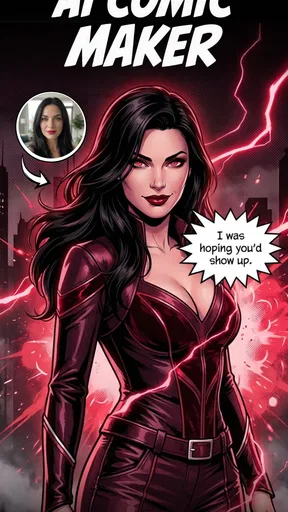
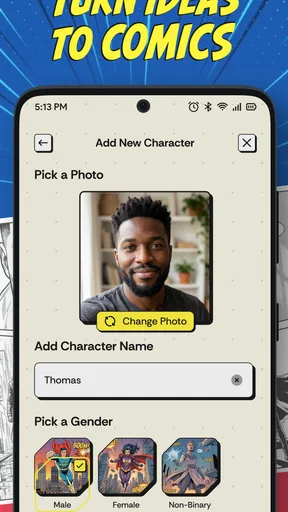
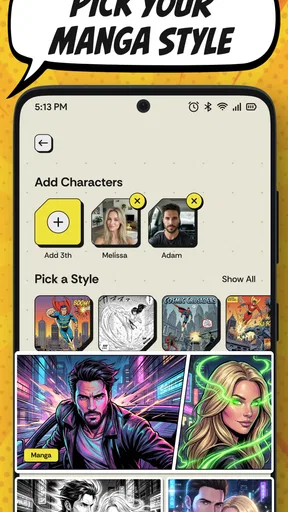
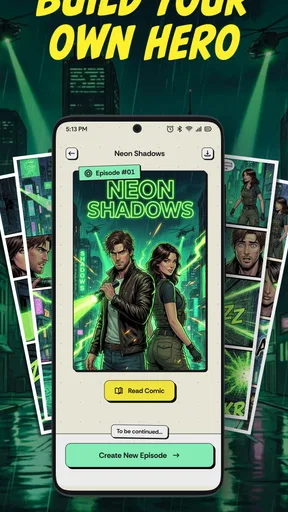
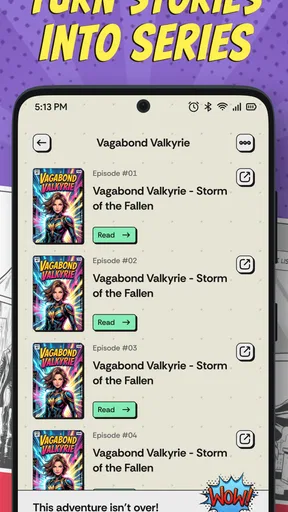
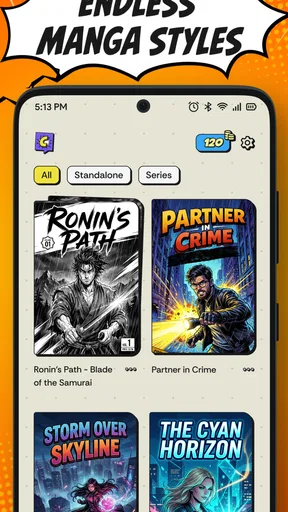
 Analysis by AppCompare
I approached Comics AI: Comic & Manga Maker as a quick creative studio rather than a replacement for a full illustration program. Its focus is clear: helping me turn an idea into comic-style artwork, manga-inspired scenes, or a small visual story without beginning with a blank canvas and drawing every panel by hand. That makes it appealing when I want to experiment quickly, especially on a phone.
The app sits in the Art & Design category and comes from Superapp Labs. It is free to install, rated for Everyone, and currently listed as version 1.1.0 for devices running Android 7.1 or later. Its store presence shows an average rating of 4.2 from around 1.5 thousand ratings, with over 10 thousand installs, so it has enough early use to suggest genuine interest while still feeling like a relatively young tool.
How Comics AI fits into a real creative workflow
My first impression is that this is best understood as an idea generator with comic-making ambitions. I would use it when I have a character concept, a funny exchange, a short scene, or a visual prompt that I want to see developed into a comic direction. It is much less intimidating than opening a traditional drawing app filled with brushes, layers, masks, and export settings.
That simplicity is also the main trade-off. A conventional drawing application gives me precise control over every line, color, layer, and correction. Comics AI instead puts more emphasis on describing what I want and judging the result. The benefit is speed; the cost is that the final image may not follow my intention perfectly, and I may need to revise the idea rather than simply edit one stubborn detail.
For a casual creator, that balance makes sense. I can use it to explore several visual directions before deciding which one deserves more careful work elsewhere. For a professional illustrator, storyboard artist, or manga creator who needs exact character continuity, it should be treated as an assistant for rough concepts, not as the entire production pipeline.
What makes the comic angle useful
Many image generators can produce attractive single pictures, but a comic needs more than an isolated image. It needs a sense of framing, expression, action, and visual sequence. The value here is that I can approach an idea with panels and storytelling in mind instead of asking only for a decorative portrait.
A practical way to use it is to begin with the story beat rather than the appearance. Instead of starting with a long description of clothing, lighting, and background, I would first define the moment: a student discovers that a supposedly ordinary notebook is speaking, or two friends misunderstand a message during a busy morning. Once the scene works, I can refine the character and setting. This keeps the creative process manageable and makes it easier to identify what needs changing.
Worth Reading Before You Choose

EA SPORTS FC Mobile 26 Is a Bigger Football Game, but It Takes Time

Flipboard Shows What News Apps Must Do Beyond the Feed

Switching to Android Auto Means Rethinking Your Driving Routine

Google Calendar Makes a Crowded Week Easier to Manage

Ludo King Makes the Most of the Minutes Between Plans

Baby Panda World Brings Quick Play to Modern Phones, but Its Game Library Feels Busy
One useful habit is to keep each request focused on one visual purpose. A prompt that asks for a character, three locations, several emotions, a complicated camera angle, and a specific lettering style may produce a crowded result. Separating those goals gives me a better chance of understanding which part of the idea the app handles well and which part needs another attempt.
I also found the app’s appeal strongest in the earliest stage of writing. If I am stuck on a page, seeing a rough comic interpretation can reveal whether the scene is funny, dramatic, confusing, or visually flat. That feedback is valuable even when the generated result is not something I would publish. It turns a vague thought into something I can react to.
A realistic everyday use case
Imagine I want to make a short birthday message for a friend. I could create a small comic about the friend trying to escape a pile of chores before being rescued by cake. I would use the app to explore the character pose, the exaggerated expressions, and the overall manga or comic mood. After choosing the most useful direction, I could add the personal wording manually in another editor if the lettering or panel arrangement did not match what I wanted.
That workflow shows where the app earns its place: it can help me get from “I have an idea” to “I can see the scene” quickly. It does not remove the need for judgment. I still have to check whether faces remain consistent, whether the action reads clearly, and whether the result actually resembles the person or story I had in mind.
Where the usual alternatives are stronger
A standard drawing app is the better choice when precision matters. If I need clean line art, repeatable layers, exact speech bubbles, or controlled edits to one character’s hand, manual tools are more dependable. They take longer to learn, but they let me fix a specific problem without regenerating the entire image.
A general image generator may be more flexible for realistic scenes, product concepts, or artwork outside comic and manga styles. On the other hand, its flexibility can make storytelling less direct. Comics AI is more attractive when the visual language of panels, manga, or illustrated scenes is central to the project.
Template-based comic editors can also be preferable for a finished social post or classroom worksheet. They usually offer predictable layouts and easier text placement. The AI approach is more exploratory, so I would choose it before the layout stage, then move to a dedicated editor when I need a polished page.
Trust, controls, and the moments that deserve care
I treat trust as part of the creative workflow, not a box to tick after I have made something. Before using a prompt or reference image, I would pause to consider whether it needs to include personal details at all, then review the choices on screen before proceeding. That habit matters just as much when a playful experiment begins to involve purchases, sharing, or material I would rather keep private.
What I would check before creating
Because this app is built around AI image creation, I would pay attention to every visible choice before submitting a prompt or image. The most important questions for me are practical: does the app clearly show what I am sending, does it ask before using device content, and can I decide whether a generated result stays on my device or is shared elsewhere?
I would not treat a free download as proof that the experience has no costs or trade-offs. The app includes optional purchases ranging from $6.99 to $89.99 per item. That makes it especially important to distinguish between trying the basic experience and committing to additional paid capabilities. I would read each purchase screen carefully, check what is included, and avoid tapping through quickly when I am only experimenting.
This is also where the app’s relatively simple presentation can work both ways. A straightforward creative flow may be comfortable for beginners, but beginners are also the users most likely to overlook a permission request or a purchase confirmation. I recommend slowing down at those points instead of assuming that every button simply creates another free image.
Handling personal and sensitive ideas
I would avoid entering private information into a prompt unless it is genuinely necessary. A comic idea rarely needs a full name, address, phone number, school details, medical information, or a photograph that identifies somebody. If I want a character inspired by a friend, I can describe broad traits rather than copying personal details.
The same caution applies to uploaded reference material. Before selecting a photo, I would ask whether the image contains other people, documents in the background, children, location clues, or anything I would not want processed as part of an online creative request. A fictional description is often enough for testing the style, and it gives me more control over what I share.
I would also separate private brainstorming from public-facing work. A prompt about a personal conflict, an unpublished story, or a client project may be harmless creatively but still sensitive in context. If the app presents a sharing option, I would use it only after reviewing the image and removing details that reveal more than the artwork needs to reveal.
How much agency the app gives me
My experience with AI creative tools is that user agency depends less on the first result and more on what happens afterward. Can I reject an image without sharing it? Can I start over with a different description? Can I save only the version I choose? Can I leave without buying anything? Those are the controls I value most when testing an app like this.
Comics AI is most comfortable when I treat generation as a conversation with my own ideas. I write a focused concept, inspect the result, identify the biggest mismatch, and revise that one issue. If the character’s mood is wrong, I change the mood. If the scene is too busy, I simplify the setting. If I change everything at once, it becomes difficult to learn what actually improved the output.
There is a less obvious advantage to this method: it creates a record of my creative decisions in my head, even when the app does not produce a perfect final panel. I learn which descriptions matter and which details are ignored. That makes the tool more useful over time than simply pressing generate repeatedly and hoping for a lucky result.
Still, I would not assume that AI output automatically gives me a finished, original comic ready for publication. I would review faces, hands, text, repeated objects, and visual continuity carefully. Comic lettering deserves special attention because even an attractive panel can fail if the words are unclear or incorrectly rendered. For anything commercial, I would also verify that the intended use fits the app’s current terms and the rights attached to any reference material.
Three practical techniques that improved my results
Build the scene in layers of thought. I first describe the action, then the setting, then the visual tone. This prevents the prompt from becoming a shopping list of disconnected details and makes revisions easier.
Use a character reference sheet outside the generation step. I keep a short written description of the character’s age range, hairstyle, clothing, personality, and recurring feature. Reusing that description gives me a better chance of maintaining a recognizable identity across separate scenes, even though AI consistency can still vary.
Reserve the app for exploration and finish elsewhere when necessary. I use the generated image to solve composition and mood, then move to a manual editor for exact dialogue, cropping, cleanup, or branding. This avoids forcing one tool to handle jobs it is not designed to control precisely.
These techniques also reveal the central limitation. The app can accelerate decisions, but it cannot decide whether the joke lands, whether the panel order is understandable, or whether a character behaves consistently with the story. I remain the editor. That is a strength for people who want creative assistance rather than automatic authorship, but it may disappoint anyone expecting a complete manga chapter from a single request.
Who should try it, and who should skip it
I would recommend it to beginners who want to experiment with visual storytelling, writers who need quick scene references, parents or educators creating playful fictional examples, and artists who want a fast way to test mood and composition. Its Everyone age rating also makes it approachable for a broad audience, although younger users should still have an adult nearby when purchases, images, or sharing choices appear.
I would be more cautious about recommending it to someone who needs strict privacy around unpublished material, exact likenesses, or confidential client work. I would also point advanced comic artists toward a drawing or layout application if their priority is panel-by-panel control. The same applies to users who dislike revising generated images or who want predictable results every time.
The cost structure matters as well. Since the app is free to start but offers in-app items from $6.99 to $89.99, I would use the free experience to decide whether its style and controls suit me before spending anything. A paid option may be worthwhile for frequent creators, but only if it solves a specific limitation in my workflow rather than encouraging endless trial and error.
My cautious verdict
Comics AI: Comic & Manga Maker is a promising creative companion for turning rough story ideas into visual experiments. I like it most as a bridge between writing and drawing: it helps me see a scene, test a tone, and discover what needs work before I invest time in a polished page. The Art & Design focus is clear, and the comic-oriented approach gives it a more specific purpose than a completely general image tool.
My recommendation comes with boundaries. I would keep prompts free of unnecessary personal information, inspect every sharing and purchase choice, and treat generated panels as drafts until I have checked their text, continuity, and suitability. I would also keep a manual editor available for final lettering and precise corrections.
With that mindset, the app is easy to justify as a free starting point for comic ideas. It is not the right choice when exact control, confidential handling, or production-ready consistency is the main requirement. For casual creators and curious storytellers, however, the strongest reason to try it is the speed at which an unwritten scene becomes something I can actually evaluate. That makes it useful, provided I stay in charge of the story and the decisions around my data.
Pros
- AI quickly turns prompts into comic-style illustrations.
- Supports manga-inspired layouts and visual storytelling.
- Useful for brainstorming characters
- scenes
- and plot ideas.
- Saves time compared with drawing every panel manually.
- Beginner-friendly for users without illustration experience.
Cons
- AI-generated characters may look inconsistent between panels.
- Results can vary significantly depending on prompt wording.
- Advanced editing and precise panel control may be limited.
- Some features or exports may require a paid subscription.
- Generated artwork may include occasional visual glitches or errors.
FAQs for Comics AI: Comic & Manga Maker
What is Comics AI: Comic & Manga Maker, and what can I create with it?
Comics AI: Comic & Manga Maker is a creative tool for producing comic strips, manga-style pages, and illustrated stories with the help of artificial intelligence. You can usually start with an idea, prompt, character description, or scene, then arrange generated artwork into panels and add dialogue, captions, and other visual elements. It is designed for beginners as well as users who want to experiment with storytelling without drawing every image manually.
Do I need drawing or design experience to use Comics AI?
No advanced drawing skills are generally required to get started. The app is built around prompts, templates, character concepts, panel layouts, and editing tools, so beginners can create a basic comic by following the available workflow. However, producing consistent characters, readable compositions, and polished pages may take practice. Users who already understand comic pacing, framing, and dialogue placement will likely achieve better results more quickly.
Is Comics AI: Comic & Manga Maker free to download and use?
The application may be available to download for free, but some features can be limited by subscriptions, premium plans, in-app purchases, credits, or usage restrictions. Advanced image generation, higher-resolution exports, additional styles, and removing watermarks may require payment, depending on the current version and platform. Before creating a large project, check the app-store listing and its subscription screen carefully so you understand what is included at no cost.
Can I use the comics I create for social media, publishing, or commercial projects?
Usage rights can depend on the app’s current terms of service, the selected plan, and whether generated assets include third-party material. Personal sharing may be permitted, while commercial publishing, advertising, merchandise, or monetized content may require a paid plan or additional permission. You should review the licensing terms before selling or distributing your work, and avoid using copyrighted characters, logos, or recognizable people without the appropriate rights.
What should I know about privacy and AI-generated content before using the app?
Before using Comics AI, review its privacy policy to understand how prompts, uploaded images, character references, and generated content are stored or processed. Avoid submitting sensitive personal information, private photographs, or material you do not have permission to upload. AI results can also contain inconsistent details, strange anatomy, unwanted text, or similarities to existing artwork, so every page should be checked and edited before being shared publicly.


